

Digital Worker capabilities are the Digital Worker’s baseline, which is different from Skills. A Skill is a procedure you package for the Digital Worker to reuse; a capability is something the Digital Worker can already do and you only decide whether to allow it.
Open the Digital Worker capabilities panel
1
Open the Digital Worker and go to Instructions
On the Digital Worker page, tab Build, select Instructions in the left column.
2
Scroll the right Configuration column to the bottom
Look for the Advanced settings group. The Digital Worker capabilities row sits at the very bottom with a counter such as 10/10 showing how many are on.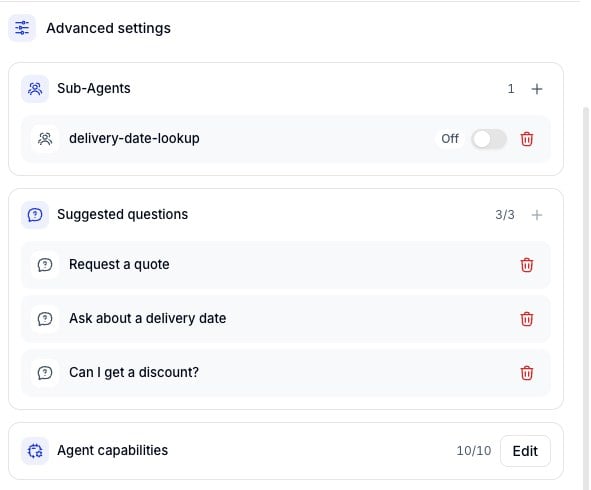
3
Click Edit
The Digital Worker capabilities dialog opens with the full list, one card per capability with its description and a toggle.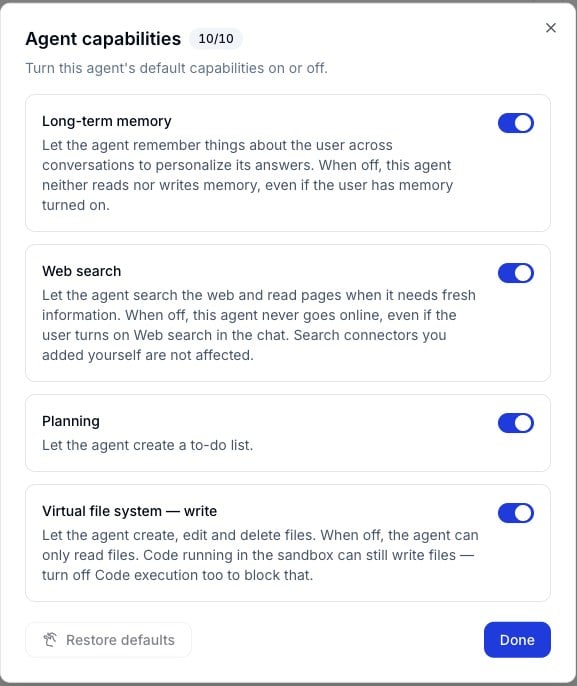
The ten default capabilities
Turn a capability on or off
Flip the toggle on the card and you are done, there is no separate save step. The counter in the dialog header follows along, for example from 10/10 down to 9/10. Click Done to close the dialog. Three capabilities interact with others, so watch out when switching them off:- Virtual file system - write and Code execution / sandbox: Turning off writing alone is not enough, because code running in the sandbox can still write files. Turn off both to block it completely.
- Default sub-agent: Switching this off only removes the platform’s shared sub-agent. Sub-agents you created yourself are not affected.
- Web search: Switching this off does not remove search Connectors you added yourself, they keep working.
Restore defaults
The Restore defaults button in the bottom left of the dialog puts all ten capabilities back to their original state. It only becomes active once you have changed at least one toggle.Changes are versioned
Flipping a toggle only changes the Digital Worker’s draft. The Digital Worker serving real users keeps running the capability set of the published version until you publish a new one. Each version records its own capability set, so rolling back to an older version brings that version’s capabilities back with it.Default capabilities cannot be added or deleted, only turned on or off. The list of ten is fixed by the platform and identical on every Digital Worker and every Workspace.