

13 October 2026
v1.13.0Turn your own API into a Connector
On the Connectors page you can turn your organisation’s own API into a Custom Connector, so Digital Workers can call internal systems or third-party services that are not yet on the Marketplace. There are two ways to create one: declare the base URL, authentication method and each endpoint by hand, or import from an OpenAPI/Swagger file or a cURL command. Once created, you test, edit, share and delete the connector just like a custom MCP.Custom API connectors in the Space
Create, view, edit and delete Custom API connectors on the Connectors page.
Use Custom APIs in a Digital Worker
Attach a connector to a Digital Worker, set permissions per operation and test it.
Type ”/” in Digital Worker.md to insert Skills, Connectors and Knowledge
While writing Instructions in Digital Worker.md, type ”/” to open a menu of the Skills, Connectors and Knowledge attached to the Digital Worker, filter by keyword and pick one to insert a reference right at the cursor, instead of typing tool names by hand. More in Instructions.Knowledge by Digital Worker version
The Build screen shows the knowledge that belongs to the Digital Worker version you are viewing. When you share a Digital Worker’s knowledge, it is added to the Space catalog so other Digital Workers can use it too. More in Knowledge bases.Start building right away
After signing in, users land straight on the Build Digital Worker screen. New accounts start on the Free plan, which allows up to 2 Digital Workers to be built at the same time. More in Build and edit Digital Workers in natural language. Other improvements- You can edit an earlier version of a Digital Worker directly: turn Skills and Guardrails on or off, or add new ones.
- The Skills and Guardrails catalog on Console is tidier, and shared items can be deleted.
- System Guardrails and the streaming response moderation box are hidden from the Tenant and Digital Worker details screens (Guardrails).
- Auto mode no longer fails the run when it approves a step that needs human confirmation (HITL).
- A draft created from the version you are viewing now shows the correct source version in its title.
- Inviting people into an organisation and switching to a tenant where you were invited as Admin no longer fail (Organisation management).
- Reloading the page while the Digital Worker is answering continues streaming the rest of the answer in Live Chat and Console.
- Creating a draft from a Digital Worker no longer leaves out knowledge bases shared into the Space.
8 October 2026
v1.12.0Schedule tasks right from the conversation
On Workspace, just message the Digital Worker to create, edit or delete a recurring task, for example sending a report every Monday morning. The Digital Worker runs it on a daily or weekly schedule and delivers the result on time, with no manual steps. Scheduling from chat is always on.Personal Skills and sharing Skills and Guardrails
Everyone can create personal Skills and share them with specific people. Workspace Guardrails can be shared too, and you can stop sharing a Skill or Guardrail at any time. The Shared label shows who an item reaches; Skills and Guardrails created inside a Digital Worker record their author and can be shared as soon as they are created. A Digital Worker cannot be published while it uses a Skill or Guardrail that is no longer available.Skills
Create, attach and share Skills for your Digital Workers.
Guardrails
Set boundaries for a Digital Worker and share Guardrails.
FPT Chat channel
Digital Workers can now be deployed to FPT Chat as a new channel, alongside Zalo, Teams, Facebook Messenger and the other Omni channels. See how to manage channels in Managing deployment channels.Test a Digital Worker with the full chat experience
The test chat on the Build screen now uses the same chat interface as Workspace: it shows tool calls and steps that need human confirmation (HITL), and the Digital Worker’s question card sits right above the input box for a quick reply.Managing organisations and departments
Super Admins assign a person on the customer side as Org Admin for each organisation. Org Admins create departments themselves and invite members into the company or a department by email, including people who do not have an account yet. More in Organisation management. Other improvements- Turning off the Sandbox only removes the ability to run code; the Digital Worker can still read files users attach (Digital Worker capabilities).
- Results from the Outlook, OneDrive and SharePoint tools are more compact, helping the Digital Worker work faster and more accurately.
- Digital Workers recognise the project’s knowledge bases more clearly when answering.
- The Builder role no longer sees the Members menu.
- Adding members with non-FPT email addresses no longer shows an error.
- The publish notification shows the correct version number (Publishing).
- Previewing a referenced file works on the first click.
- The sign-up and sign-in flow with FPT ID has been refined to run more smoothly.
- A failed upload is reported only once.
- Removing a Skill or Guardrail from a Digital Worker now asks for confirmation, and the action is labelled Remove instead of Delete.
6 October 2026
v1.11.0Knowledge bases on Console
Create a knowledge base shared across the whole Space and link it to every Digital Worker that needs to look things up, instead of uploading documents again for each Digital Worker. Each Digital Worker can still have its own knowledge base alongside the linked ones. Upload TXT, MD, PDF, Word, PowerPoint, Excel and CSV documents, organise them in folders, follow the processing status of each file (Waiting → Processing → Completed or Failed), and rename, move, reprocess or delete one file or many at once. More in Knowledge bases.Permissions for each knowledge base
The owner chooses who can manage a knowledge base: only themselves, every Console user, or specific people. Permission to use the knowledge base for answers is set separately, so many Digital Workers can look up one knowledge base without giving everyone edit access. More in Knowledge base permissions.Customise the Live Chat welcome screen
Widget customisation gains a Greeting tab: set the title, description and input placeholder for the first screen customers see when they open the chat. To take customers straight into the conversation, turn on Skip welcome screen. See Live Chat channel. Other improvements- The sources under an answer list only the knowledge documents the Digital Worker actually cited, no longer including results that were found but not used.
- PDF files with whitespace before the file header now upload and read normally.
- Long file names no longer break dialog titles and the upload dialog on Console.
- Cancelling a change that narrows knowledge base access restores the people who were just removed.
- Confirmation dialogs in the knowledge area no longer cover the dialog being confirmed.
- Cancelling a rename no longer makes the create form flash.
2 October 2026
v1.10.0Sharing a conversation
Send the link to a conversation to other users on the platform so they can read it or carry it on. With view access, they see the conversation as it stood when you shared it. With edit access, they continue on a branch of their own, so your original conversation is left untouched.Publishing an artifact as a public page
Turn what the Digital Worker produced into a web page with its own link, to send to customers or anyone without an account, no sign-in needed. You can set a password or a time limit on access, and unpublish whenever you want.Highlight to ask a follow-up
Highlight any passage in a Digital Worker answer, choose Ask and type your question. The selected passage is attached to the question, so the Digital Worker answers about exactly that part while keeping the thread of the conversation. Copying text works just as before.Turning a Digital Worker’s default capabilities on or off
Keep or switch off each of a Digital Worker’s default capabilities, per version, so the Digital Worker does only the work you need from it.Tidier multi-step work
With models that reason, the Digital Worker now carries its line of thought from one tool step to the next instead of planning again from scratch after each step. It goes round in circles less, finishes sooner and uses fewer resources. Other improvements- Live Chat answers display formatted text, files, links, images and carousels directly.
- Digital Workers can answer from knowledge published to a company or department when a member of that unit is chatting.
- Documents uploaded to knowledge from Console go through the standard document processing pipeline, for steadier search results.
- Knowledge cards on Console show the exact date and time of the last update.
- The icons and names of the tools the Digital Worker uses while working are now correct and consistent.
- Guardrails also check the Digital Worker’s answers, blocking content that breaks the policy even when a question tries to slip around it.
30 September 2026
v1.9.2Scheduled runs for Digital Workers
Set a Digital Worker to handle recurring work on its own: Create a task with the request, pick a daily or weekly cycle and the time it runs. When the time comes, the Digital Worker does the work and posts the result into your conversation. You can see the history of every run, and pause or resume it whenever you want.Charts right inside the conversation
When an answer carries data, the Digital Worker draws the chart in the chat instead of just listing numbers. Bar, line, pie, area and scatter charts are supported, each with a data table alongside for checking. Hover a point to read the exact value; charts follow the light or dark theme.Suggested follow-up questions after every answer
Under each answer there are a few suggested questions that follow what you are discussing. One click sends it, so you do not have to work out what to ask next. You can turn the suggestions off in settings.Processing steps collapsed into one group
The narration and the tools a Digital Worker calls while working are now gathered into a single collapsed group that you open when you want the detail. Each step is also named in plainer language.Messages sent back to back keep their order
When a customer sends several messages in a row on an external channel while the Digital Worker is still replying, the messages are handled in order instead of overlapping. An image and the text split across two messages are also merged into one request.MCP connections with OAuth 2.1
MCP servers now connect over the OAuth 2.1 standard, with no dependence on any single provider. Other improvements- Chat shows the context compaction status with a progress bar and a line recorded in the conversation history.
- Refine with AI picks up configuration files that were edited by hand between turns.
- Reloading the page restores every file the Digital Worker created in the chat.
- The chat no longer jumps while reloading: Image frames keep their size and the content is laid out in advance.
- Confirmation questions no longer disappear with an error when you have not answered yet.
- Updated cover images and fixed the getting started cards on the Console home screen.
- The description of the allowed domain list for embedding the chat widget now matches the actual behaviour.
- Files waiting to be deleted no longer appear in knowledge search results.
24 September 2026
v1.8.0Web search and Deep Research mode
In the chat on Workspace you turn web search on or off for each conversation; when a question needs information from the web and the feature is off, the Digital Worker reminds you to turn it back on. Deep Research mode lets the Digital Worker consult several sources at once and come back with a consolidated report instead of answering straight away.Conversation history stays with the Digital Worker
A Digital Worker shared across workspaces now keeps its conversation history on the Digital Worker itself, so you can review all of its conversations no matter which workspace you opened it from.A smoother Live Chat experience
Digital Worker answers now appear smoothly, word by word, instead of jumping in chunks. The cursor stays in the input box after each send, so a customer can write the next message and attach files while the Digital Worker is still replying. The chat widget also runs only on the domains you have declared, which keeps control over where it is embedded. Other improvements- Uploaded skill packages keep every file type, and the Digital Worker can read binary files that come with the package.
- Fixed the Guardrail “View details” window showing the wrong topic and description.
- Fixed links and cover images in the getting started section on the Console home screen.
22 September 2026
v1.7.0A personalised experience with your Digital Worker
Tell the Digital Worker your nickname, your job and anything else you want it to know, so its answers fit what you need. The Digital Worker remembers things from your conversations on its own; you can ask it to update them, edit them directly, delete them, or turn memory off at any time. Memory is stored separately for each workspace.Branch into a new conversation
From any answer in the history you can split off a new conversation to try a different direction without touching the original thread. The new branch keeps the context and attachments up to the turn you branched from, and deleting one side does not affect the other.Deploy a Digital Worker to Microsoft Teams
Digital Workers talk to customers directly on Microsoft Teams, with a configuration screen per channel on Console. Teams also gains filters and message indicators that make conversations easier to follow.Connect third-party Digital Workers to Console
Connect Digital Workers built outside the platform into Console and use the same chat interface on Workspace. The connection configuration is versioned, with draft, publish and roll back to an earlier version; each version keeps its own credentials and the connection can be tested before you publish.Managing roles and members in an organisation
See the default roles with the permissions attached to each, invite members into the organisation and assign roles, then update or remove a role at any time. Permissions cover Connectors, Guardrails, Skills, Digital Workers and roles. More in Organisation management.Choose the approval mode when refining a Digital Worker with AI
When you use AI to refine a Digital Worker you choose whether it applies its proposals automatically or you approve each step. Automatic is the default, and the system remembers your last choice.Send JSON and HTML in a conversation
The input box takes JSON and HTML directly, keeping the structure both on screen and when it is sent to the Digital Worker. Other improvements- New models added.
- Regenerating an answer and editing a question now replace in place on the last turn, with a switch to move between the versions you have generated.
- Download a Digital Worker answer as PDF, Markdown or Word.
- Conversation history also shows the tools the Digital Worker used, and a conversation can be found from part of its identifier.
- Added greeting configuration for Live Chat.
- Fixed the wrong date and time display and the preview that would not scroll when customising the Live Chat widget.
- Save confirmations no longer stay stuck on screen covering other content.
- Input suggestions in widget customisation now show in the default language you selected.
- Reviewed all Indonesian content across the Digital Worker.
- Web search and page loading are now two separate tools, which gives tighter, more accurate results.
18 September 2026
v1.6.0Declining an invitation
People invited to an organisation can now decline rather than leave the invitation hanging. Declined shows as its own column in the invitation list, so administrators can see at a glance who has joined, who has not replied and who has declined. More in Organisation management.Create a project with knowledge and conversations attached
When creating a new project you can bring knowledge documents and conversations in with it, instead of adding each piece afterwards.Default roles and permissions for new organisations
A newly created organisation arrives with a default set of roles and permissions, so an administrator can invite people and assign access straight away. More in Organisation management.Clearer test chat before release
The test chat panel in Console now shows the Digital Worker name at the top, in full. Each test chat is also saved as its own conversation in the Digital Worker’s history rather than being lumped together, so you can look back at individual test runs. Other improvements- Built-in connector actions keep their original tool names, which helps the Digital Worker call the right one.
- Removed redundant interface labels from the chat widget configuration.
16 September 2026
v1.5.0Voice input
Speak instead of typing: tap the microphone in the Workspace chat box and what you say is transcribed straight into the input for the Digital Worker.Deploying a Digital Worker to Live Chat
Live Chat is a new deployment channel: a ready-made chat window whose colours, greeting and suggested questions you set on Console. Take the Digital Worker to your customers by pasting a snippet into your website, sharing a link or QR code, or embedding it in an Android or iOS app. See Live Chat channel.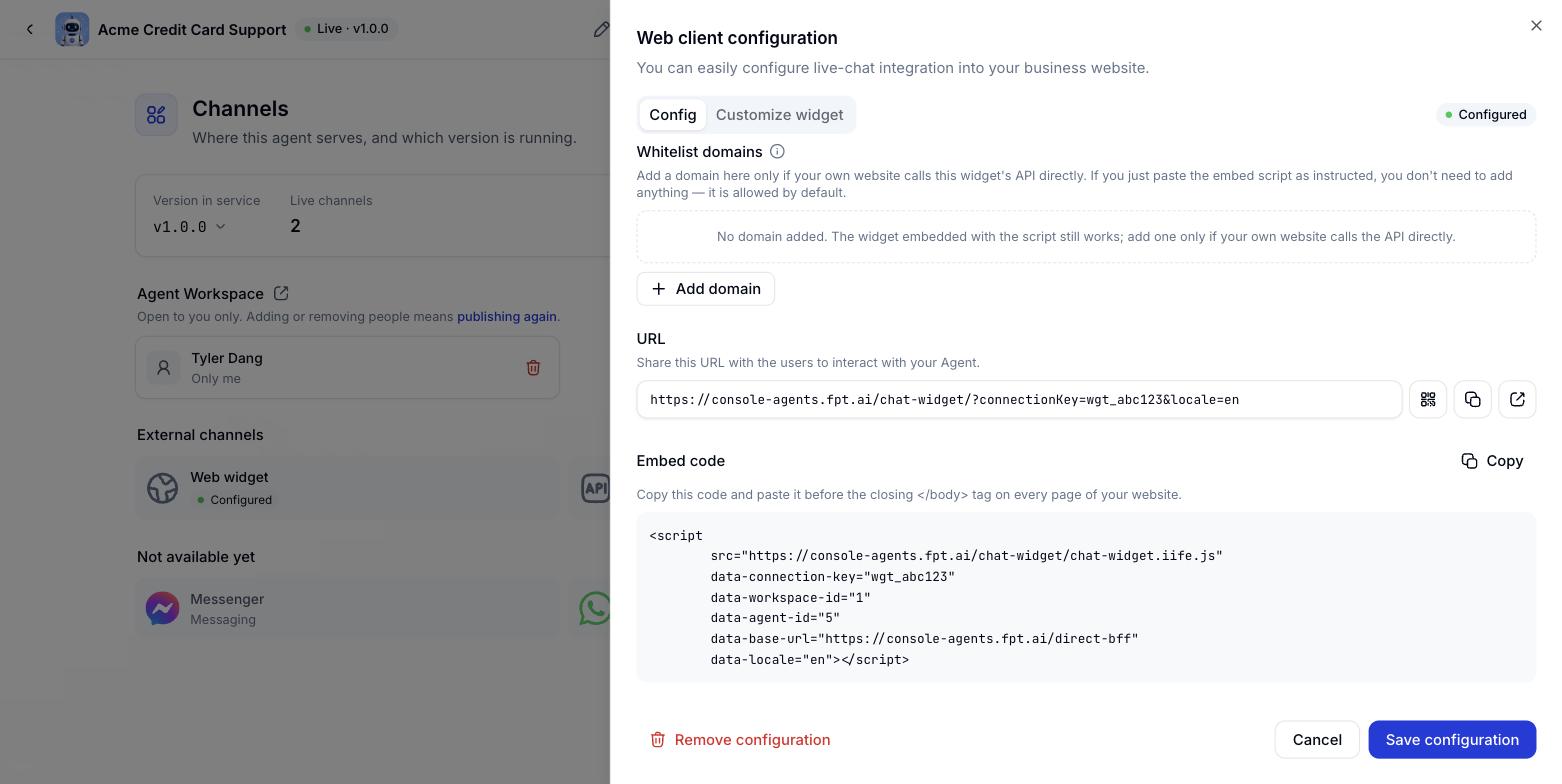
Live Chat channel configuration on Console
Integrating a Digital Worker over the API
Already have your own chat interface, a self-run Zalo OA or a contact centre? The API channel lets your systems pass customer messages to the Digital Worker over a webhook and receive answers back over a callback, with support for buttons, quick replies, carousels and source citations. Every packet is signed. See API integration.Pausing a sub-agent
Disconnect a sub-agent without deleting it, and reconnect whenever you need it again. More in Sub-agents. Other improvements- Fixed a connection problem with the Zalo channel.
- The default content guardrail recognises unsuitable content more accurately and is harder to get around.
- Hardened security across all input.
- Digital Workers can read larger attachments.
- Built-in Digital Worker templates display in your language and are more compact.
- Integration guides state which version they apply to.
11 September 2026
v1.4.0Deploying a Digital Worker on Zalo
Digital Workers talk to customers directly on Zalo, with messages formatted to suit the channel. The Digital Worker can read files customers send over Zalo and supports a range of file types. See how to manage channels in Publishing.Managing companies, departments and guests
Organisation administrators create and manage companies, departments and the members of each. People outside the organisation can be invited into a company as guests, with nothing more than an email address. More in Organisation management.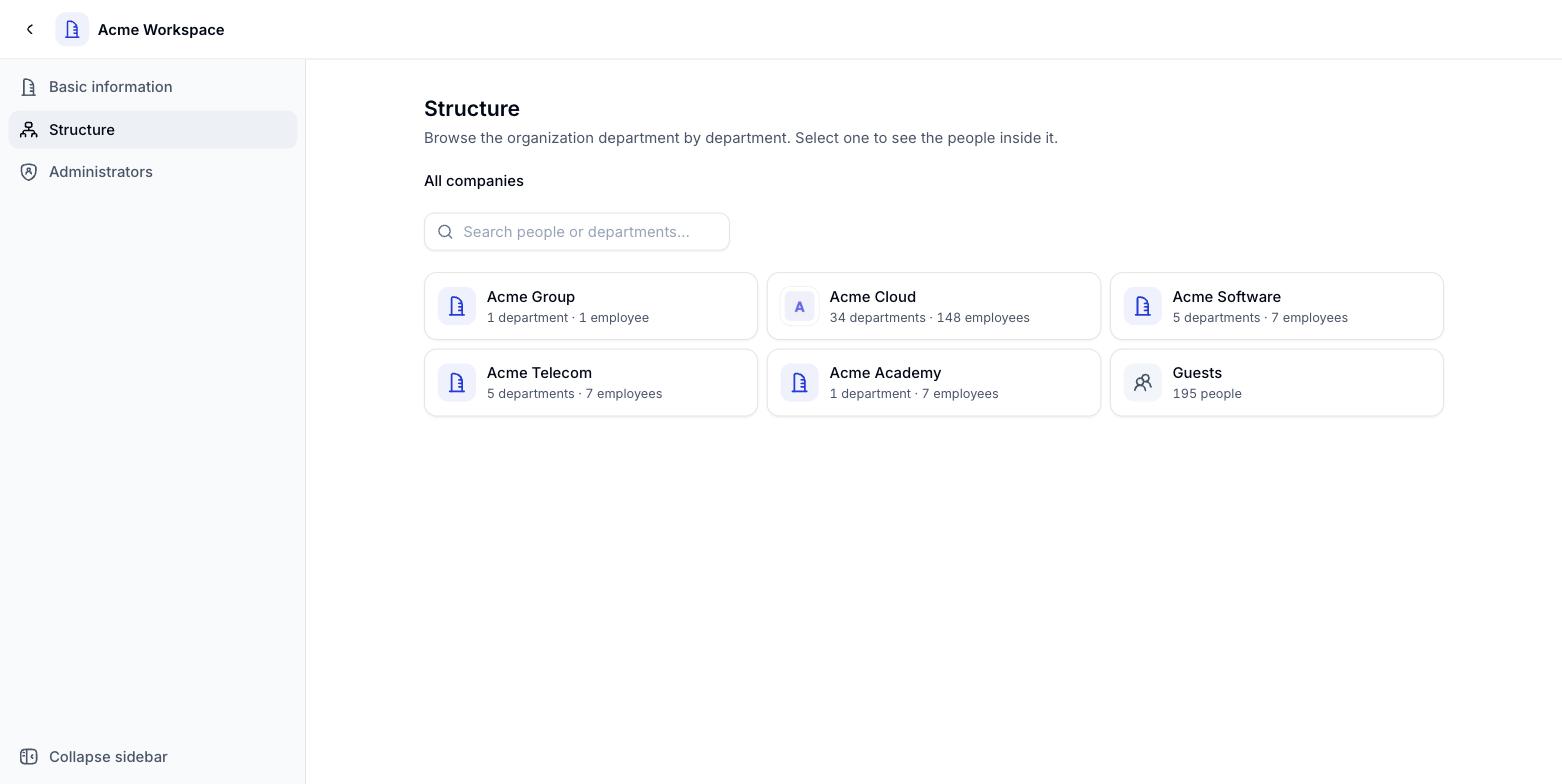
Company and department chart in Organisation management
Default content guardrail
Digital Workers created or edited in Console and Workspace now come with the system’s default content guardrail applied. You can still add your own rules per Digital Worker. More in Guardrails. Other improvements- Digital Workers no longer hang for long stretches when a model stops responding mid-answer.
- Digital Workers still return source citations when a connector cannot connect.
- Creating a new Digital Worker version no longer puts it into production automatically. A version only goes live when you publish it deliberately.
- Clearer error reporting when the Digital Worker’s code execution environment runs into trouble.
- Security hardening and updated interface wording.
8 September 2026
v1.3.0Suggested questions for Digital Workers
Set up to 3 suggested questions per Digital Worker in FPT AI Console. When a user opens a new conversation the questions appear under the input box - one click and they are away, with nothing to think up first. Other improvements- Security hardening across Workspace and FPT AI Console.
4 September 2026
v1.2.0Publishing Digital Workers by org / unit
Administrators grant access per org or unit, place Digital Workers into the right unit themselves, and approve before a Digital Worker is published to that unit. See Publishing.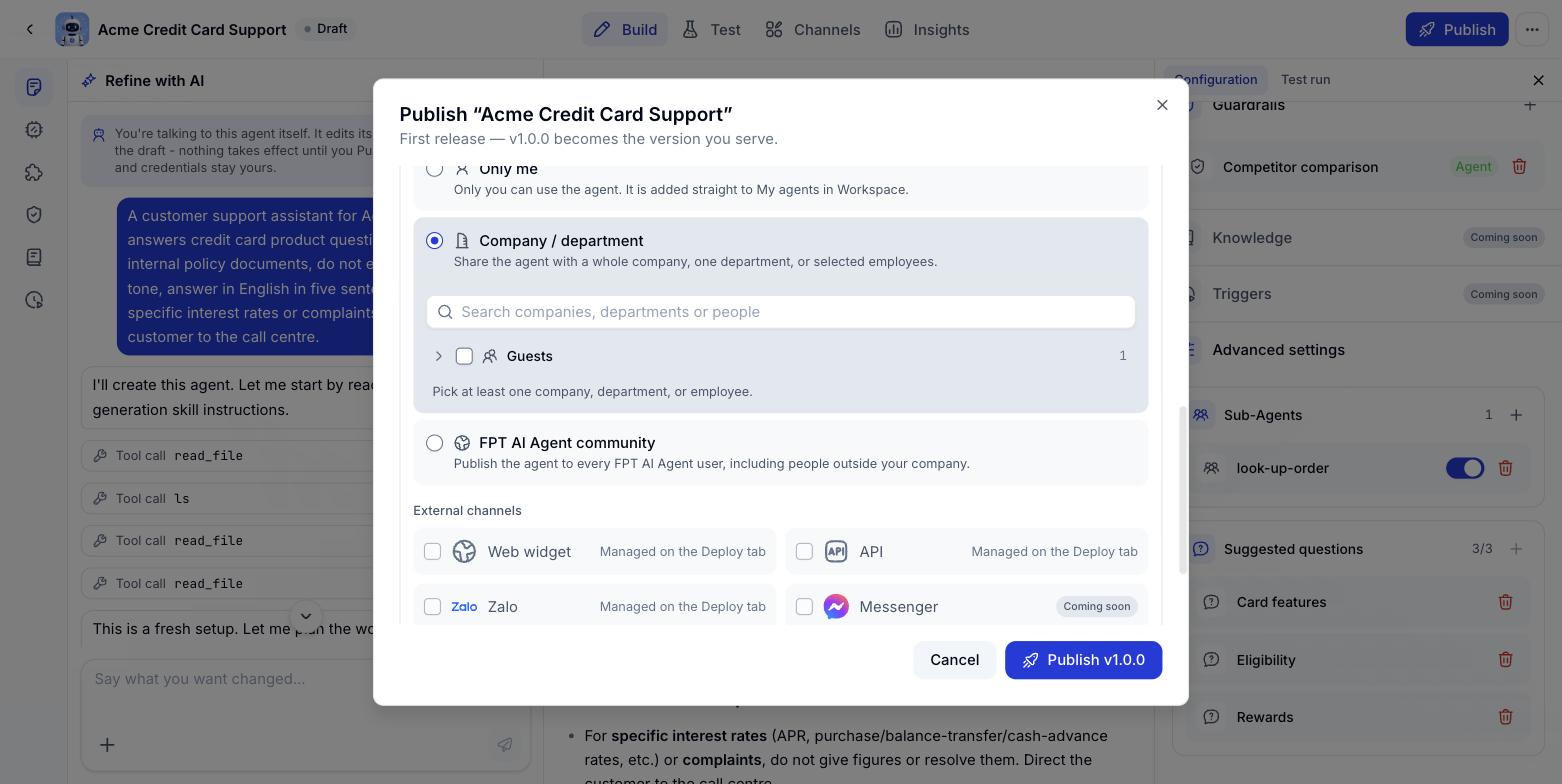
Choosing companies and departments when publishing
- Digital Workers can answer at greater length without being cut off mid-sentence.
- Code execution is faster and more stable.
- Clearer status when a model runs into trouble.
- Fixed connector status display in Console and a connector configuration bug for sub-agents.